
Small Influencers: How Brands Find and Choose Creators
Find small influencers for your brand. Compare audience fit, recent reach, engagement quality and campaign costs before choosing nano or micro-creators.

Quick answers
Choose a reporting period, collect campaign costs and attributed orders, remove duplicate orders across links and codes, and subtract costs from net attributed revenue. State the cost basis used for ROI. Keep views, retention and estimated future value separate from measured profit.
On the all-cost basis used here, ROI is (net attributed revenue minus total included costs) divided by total included costs, multiplied by 100. Include both campaign costs and direct costs of fulfilling those orders. Unknown costs prevent a final ROI; a zero denominator makes it undefined.
The prompt below uses available held post context plus aggregate sales and costs you supply. Your connected assistant checks the arithmetic and drafts a review. It does not connect to your store, import orders or establish which sales the campaign caused.
Start with the orders and costs behind the number. Use this prompt to turn a YouTube campaign’s available post data and your supplied sales summary into a review you can check.
Manual route: use the same ledger in a spreadsheet, or paste your post URLs and aggregate inputs into your assistant. Mysocial is optional for checking the arithmetic.
Jump to the worked example, tracking setup or the formula.
Original fictional example: a home-fitness brand reviews one sponsored YouTube video over an agreed 30-day period. These are teaching inputs, not a customer result or an expected return.
1 · Count each order once
12 orders linked to campaign traffic + 8 code orders − 5 orders appearing in both lists = 15 attributed orders.
2 · Include the costs
Net attributed revenue: $2,400, after discounts and refunds, excluding sales tax. Direct order costs: $1,200. Campaign costs: $1,000 ($800 creator fee + $150 production + $50 sample and shipping).
3 · Check the arithmetic
Total included costs: $1,200 + $1,000 = $2,200. Attributed profit: $2,400 − $2,200 = $200. ROI on this all-cost basis: $200 ÷ $2,200 × 100 = 9.1%, rounded.
Reviewed output: “The supplied summary attributes 15 distinct orders to this campaign and shows $200 profit after $2,200 included costs: 9.1% ROI on an all-cost basis. This is not proof of 15 incremental sales. Next check: reconcile refunds and the link/code overlap against the store’s own records.”
What changes the answer? If the five-order overlap is unknown, the unique total is unknown. If fulfilment costs are missing, profit and ROI are provisional. The $2,400 ÷ $1,000 = 2.4 revenue-to-campaign-cost multiple is a different metric; do not label it profit ROI.
For the all-cost definition in this guide:
ROI (%) = (net attributed revenue − total included costs) ÷ total included costs × 100
Total included costs = campaign costs + direct costs of the attributed orders.
Google’s ROI example includes product costs and advertising costs before dividing profit by those costs. A team using campaign spend alone as its denominator must label that different basis and still account for order costs when calculating profit. Agree on the basis before comparing results.
Keep a short cost ledger: creator fee, production, samples at cost, shipping, management time and allocated tools or amplification where included. Avoid counting the same item in both campaign and order costs. Name excluded overhead rather than calling the result the company’s total profit.
Stop conditions: zero total included costs means ROI is undefined. Unknown revenue is not zero revenue. Missing or disputed inputs should produce an incomplete review, not a confident percentage.
Make it yours: replace the campaign, dates and cost basis in the prompt. For an awareness campaign without sales data, ask for an attention-and-traffic review; leave financial ROI unknown.
| Check | What it tells you |
|---|---|
| Post views | Observed video activity at a stated date, not orders. |
| Retention | Attention during the video, not unique buyers. |
| Link traffic | Visits or clicks under the tracking system’s definition. |
| Attributed orders | Distinct orders after link/code overlap is removed. |
| Campaign efficiency | Campaign cost per reported view or distinct attributed order. |
| Profit and ROI | A financial calculation using a stated cost basis. |
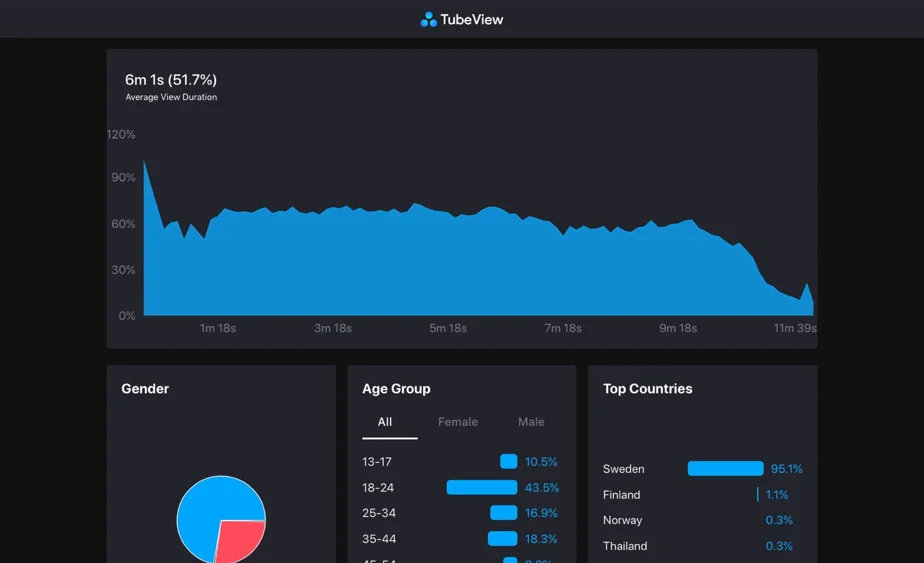
YouTube’s retention report shows attention at different points in a video. Rewatching can make a segment’s view count exceed the video’s total views. Multiplying total views by retention at a sponsor timestamp does not establish unique sponsor exposure or sales.
The original hero above shows a historical TubeView interface, with a retention chart and audience breakdowns. It is retained as a visual example of attention data, not a current Mysocial feature screenshot or evidence of campaign ROI. An average percentage watched does not mean that percentage of viewers finished the video. Ask the creator for the relevant YouTube Studio report when you need retention detail.
Keep the original discovery diagram as a reminder to check traffic sources as well as total views:
Search
Search discovery
Suggested
Suggested & browse
External
Social, embeds, links
Views
Over time
Search, recommendations and external links are discovery routes. Check the actual traffic sources and dates; future views are unknown.
Choose follow-up dates that fit your buying cycle, such as an initial close and a later review. Reconcile cumulative orders, refunds and any additional costs at each date. Do not add the same sale to both reports and then sum them.
Future revenue stays a projection. Additional views do not guarantee additional sales; keep estimates outside measured ROI. There is no universal share of lifetime YouTube campaign value captured in the first 30 days.
For an illustrative $1,000 campaign and 10,000 reported views, campaign cost per reported view is $0.10. At 20,000 views it would be $0.05 only if costs stayed $1,000. Neither number establishes profitability or unique people reached.
Compare creators using the same cost inclusions, metric definition, format and reporting period. This guide does not supply a universal cross-platform CPV or ROI benchmark. For planning fees, use the separate YouTube influencer pricing guide.
Confirm the post URLs, tracked links, code, reporting dates, cost owner and attribution rule in the campaign brief. Assign someone to check refunds and overlap after the campaign. Test the destination link and tracking setup before the video is published.
For a later comparison, keep a dated copy of the input summary and the calculation basis. A changed attribution rule can change reported ROI without changing the campaign itself.
Mysocial provides social media intelligence. For this review, it can supply available held creator posts, source URLs, metrics and coverage information through the connected assistant. Tracked-creator post access requires Universe access; missing posts or old metric dates must remain visible in the review.
You supply the aggregate sales and cost summary. Use your store or finance records for orders and refunds, your analytics setup for campaign traffic, and creator-shared YouTube Studio reports for retention. The prompt does not connect those systems automatically or start new paid research.
Before you share the draft: check each source date, verify the arithmetic, confirm the cost basis and replace any unsupported conclusion with a question. A spreadsheet with the same inputs is a valid manual alternative.
For campaign-wide KPI selection, use the canonical influencer measurement guide. To present a reviewed result to a client, use the client social media report template. To try another practical job, open the Mysocial prompt library.
Influencer Marketing Strategy
Related Posts
Find small influencers for your brand. Compare audience fit, recent reach, engagement quality and campaign costs before choosing nano or micro-creators.

Create a clear brand partnership proposal with deliverables, pricing, dates and evidence. Copy the template or build and download a draft for free.

Review negative comments, check product claims and draft a useful reply. Try a Mysocial prompt with a worked example for creators and campaign teams.