
How to Create a Content Calendar That Grows
Build a content calendar that drives growth. Content pillars, platform-specific posting rhythm, batch workflows, and weekly review system.

Quick answers
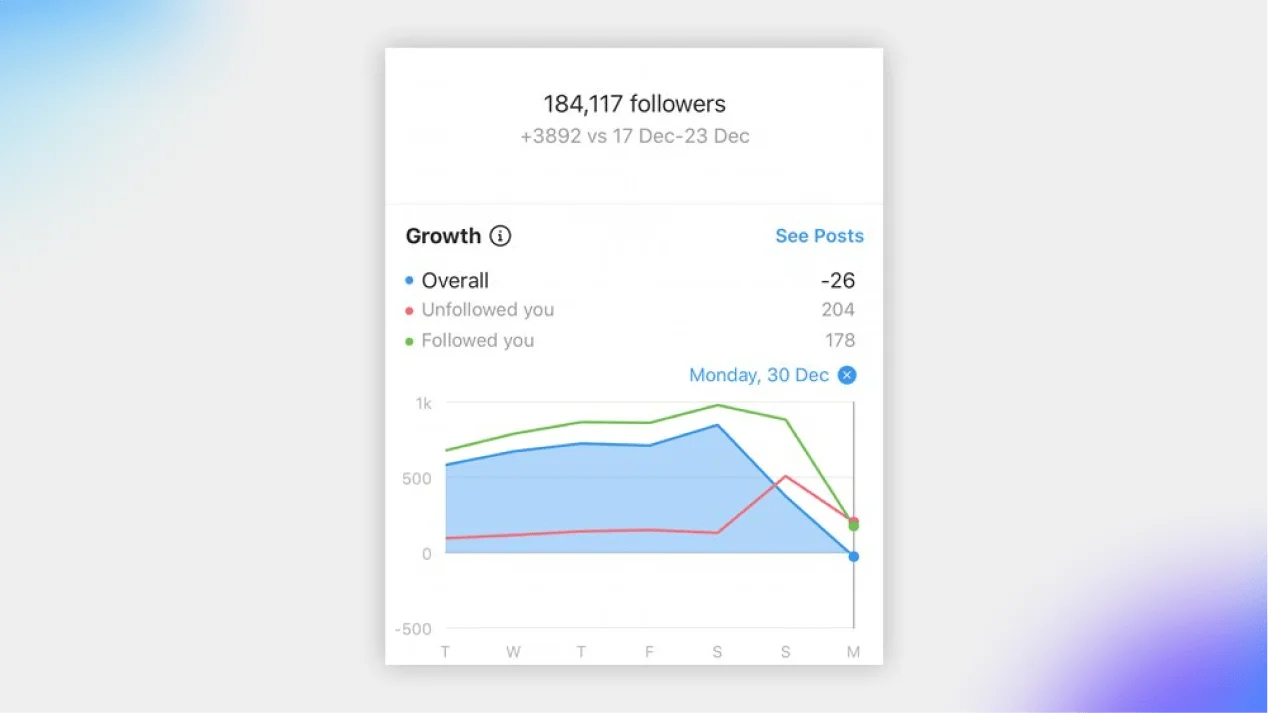
The most common cause of sudden drops is Instagram's bot and fake account purges — the platform removed 490M+ fake accounts in the past year. Other causes include algorithm changes reducing your visibility, account deactivations, and follow/unfollow tactics from other users. Check your analytics to distinguish between a purge and a real engagement problem.
Losing 1-3% of followers per month is normal and expected — this comes from account deactivations, bot purges, and natural audience turnover. If you're losing more than 5% monthly or seeing a sustained downward trend, that signals a content or strategy problem that needs fixing.
Yes. 18% of marketers report losing followers from posting too frequently. The sweet spot is 3-5 feed posts per week plus daily Stories. Posting more than once or twice a day to your feed can overwhelm follower feeds and trigger unfollows — especially if the content quality drops to maintain volume.
Focus on shares — the most powerful algorithm signal in 2026. Create content people want to send to friends. Post original content (40-60% more distribution than reposts), engage with comments within the first hour, use interactive Story stickers, and audit your content for what gets saved and shared vs. what just gets scrolled past.
Yes. Instagram regularly purges fake, bot, and inactive accounts from the platform. When these accounts are removed, your follower count drops even though you did nothing wrong. This is actually healthy — your engagement rate improves because those accounts were never engaging with your content anyway.
You wake up, check your Instagram, and your follower count has dropped. Again. You posted consistently, used good hashtags, and your content looks solid — so what went wrong?
Here is the uncomfortable truth: most creators blame the algorithm, but the data tells a different story. 44% of follower loss comes from content and posting problems, 20% from Instagram’s bot purges, and the rest from algorithm shifts and natural audience turnover. The good news is that most of these are fixable — once you know which one is actually hitting you.
This is a data-driven breakdown of every reason your Instagram followers are dropping, and the exact fix for each one.
490M+
Fake accounts removed by Instagram in the past 12 months
44%
Of follower loss caused by content and posting issues
14%
Platform-wide decline in follower growth rates (2024-2025)
3%+
Engagement rate benchmark — below this signals a problem
Follower Loss — By Root Cause
Inconsistent Posting
Posting less than 3x/week causes the algorithm to deprioritize you
44%
Inconsistent Visual Identity
Messy branding and random content confuses new visitors
26%
Bot & Fake Account Purges
Instagram removed 490M+ fake accounts — your count drops but your account is healthier
20%
Over-Posting / Content Fatigue
Posting too much overwhelms feeds and triggers unfollows
18%
Banned or Repetitive Hashtags
Same hashtags every post = spam flag, reduced distribution
17%
Too Promotional / No Value
43% of marketers report losing followers from constant sales pitches
Follow/Unfollow Tactics
Accounts follow you for a follow-back, then unfollow days later
Understanding the algorithm is the first step to stopping follower loss. Instagram does not use one algorithm — it uses separate ranking systems for Feed, Reels, Stories, and Explore. But three signals dominate across all surfaces.
#1 Signal
Shares & Sends
The most powerful signal. When someone sends your content to a friend via DM, Instagram treats it as the highest quality indicator and distributes it to non-followers.
#2 Signal
Watch Time
Average watch time per view matters more than total views. A Reel watched 50% by 1,000 people ranks higher than one watched 10% by 5,000. Retention is everything.
#3 Signal
Saves & Comments
Saves signal intent to revisit — a stronger indicator than likes. Comments (especially substantive ones) show active engagement. Both boost your reach to explore.
The shift is clear: Instagram now rewards depth of engagement over breadth. A smaller, highly engaged audience is worth more — to the algorithm and to brands — than a large, passive one. If your content does not generate shares, saves, and comments, your reach declines and followers slowly drift away.
Step 01
The data is clear on this one: 3-5 feed posts per week + daily Stories is the optimal range.
• Under 3 posts/week — the algorithm deprioritizes your content, reach drops, followers forget you exist
• Over 2 posts/day — content quality suffers and follower feeds get overwhelmed, triggering unfollows (18% of losses)
• Stories daily — keeps you at the top of the Stories bar. Use interactive stickers for 2x engagement
✅ Posting 3-5x weekly more than doubles follower growth compared to posting once or twice.
Step 02
Shares are the #1 algorithm signal in 2026. Optimize for DM sends, not just heart taps.
• Create 'send-to-a-friend' content — relatable memes, surprising data, controversial takes, and tutorials people want to bookmark
• Original content gets 40-60% more reach — stop reposting. Accounts with 10+ reposts in 30 days get excluded from recommendations
• Carousels get 3x engagement vs. static posts and the highest save rates — ideal for educational, shareable content
✅ Ask yourself before posting: 'Would someone screenshot this or send it to a friend?' If not, rethink the angle.
Step 03
43% of marketers report losing followers from constant promotion. Follow the 70-20-10 rule.
• 70% value content — tips, insights, tutorials, industry takes, educational carousels
• 20% personality content — behind-the-scenes, day-in-life, opinions, real talk
• 10% promotional — product launches, brand deals, CTAs
✅ If you are promoting something, add genuine value alongside the promotion. A product review with honest pros/cons outperforms a sales pitch every time.
Step 04
The algorithm evaluates early engagement signals to decide how far to distribute your content. The first 30-60 minutes are critical.
• Reply to every comment within the first hour — this triggers more comments and signals active engagement
• Add a question or CTA in your caption — give people a reason to comment, not just scroll
• Post when your audience is active — check your Instagram Insights for peak times (typically midday or early evening on weekdays)
✅ Engagement is a two-way street. Creators who only post without engaging in conversations lose followers faster than those who show up in the comments.
Step 05
Using the same hashtags on every post flags your account as potential spam — 17% of follower losses trace back to hashtag problems.
• Rotate 3-5 hashtag sets of 15-20 relevant hashtags each
• Check for banned hashtags — search each hashtag on Instagram. If only a 'Top Posts' section shows (no 'Recent'), it may be restricted
• Mix sizes — combine large (500K+ posts), medium (50K-500K), and small (10K-50K) hashtags for maximum discoverability
✅ Instagram's algorithm has gotten smarter — hashtag stuffing hurts you. Relevance matters more than volume.
Step 06
Every Reel or Explore placement sends new visitors to your profile. If your grid looks inconsistent, they leave without following.
• Consistent visual identity — 26% of unfollows come from messy branding. Stick to a color palette, editing style, and content format
• Clear bio — state who you are, what you post about, and why someone should follow in under 150 characters
• Curated Highlights — pin your best Story content into organized Highlights that tell new visitors what to expect
• Use a media kit link in bio — professional and trackable, signals you take your creator business seriously
✅ Your profile is your landing page. Treat it like one.
If your engagement is below these benchmarks, your follower loss is likely a content problem, not a bot purge. Use your analytics dashboard to check.
Instagram Engagement Rate by Account Size (2026)
Engagement rate
0% to 6%
Account size
Nano (1K-10K)
5%Micro (10K-50K)
3.5%Mid (50K-100K)
2.8%Macro (100K-500K)
2%Mega (500K+)
1.2%Source: Buffer, CreatorFlow, 2026. Median rate across all sizes: 4.3%
Do not panic over small drops — 1-3% monthly loss is normal from purges and deactivations. Only investigate sustained multi-week declines
Do not buy followers — they get purged, tank your engagement rate, and make you look fraudulent to brands who verify audience authenticity
Do not use the same hashtags every post — Instagram flags this as spam behavior and restricts your distribution
Do not post more than 2x daily to your feed — over-posting leads to quality drops and content fatigue (18% of unfollows)
Do not ignore Stories and Reels — feed-only accounts are being deprioritized. Instagram rewards creators who use all its formats
Do not make every post a sales pitch — 43% of marketers report losing followers from over-promotion. Follow the 70-20-10 rule
Post 3-5 times per week consistently — consistency signals reliability to both the algorithm and your audience
Create share-worthy content — shares and DM sends are the #1 algorithm signal in 2026. Optimize for 'would someone send this to a friend?'
Use interactive Story stickers daily — polls, quizzes, and sliders trigger 2x more engagement and keep you visible
Engage in the first hour — reply to comments and interact with your niche. Early signals determine how far your content spreads
Post original content — original gets 40-60% more distribution. Repost accounts get penalized in recommendations
Track your analytics weekly — use reporting tools to identify which content types retain and attract followers
Increase Instagram Engagement →
Proven tactics for higher reach, saves, and shares
Grow to 10K Instagram Followers →
Step-by-step growth framework from zero to 10K
Content Calendar That Grows Your Audience →
Solve the consistency problem with a repeatable system
Create an Instagram Media Kit →
Present your engagement data professionally to brands
MySocial gives you auto-updating analytics, verified engagement rates, audience demographics, and growth tracking across Instagram, TikTok, and YouTube. Know exactly where you stand — and what to fix.
Get your free analyticsSocial Media Growth & Algorithms
Related Posts
Build a content calendar that drives growth. Content pillars, platform-specific posting rhythm, batch workflows, and weekly review system.

Your Instagram bio link loses followers to in-app browsers. Fix it with deep linking to boost conversions and keep traffic in-app.
25 Instagram Story ideas for creators and brands. Interactive stickers, content formulas, and formats to grow reach and conversions.